Home / Forum / Suggestions / I return to teams according to the second act.

I return to teams according to the second act.

Hello Stefano,

I’ve seen the versions progress like symbols in a slot machine :) We’re at 5.9.0, while you mentioned 5.6.9. I’m telling you just in case it was a typo, since I didn’t see it pass through 5.7 and 5.8. While writing this I saw the birth of 5.9.1!


I also noticed the late‑registration issue; in intermediate versions it allowed adding a team but then you couldn’t populate it, now everything seems to be there. It needs to be tested in various scenarios.


When working with teams, there’s still the “annoyance” that when you expand a team the page jumps back to the top, making it hard to insert the roster and forcing the user to scroll down. With many teams this is particularly annoying. I remember we already addressed this point, maybe it has come back.


I like the new “Presentation mode” and the “Board print”… we’ll try them out. The mentioned “Q” exit button doesn’t seem to work. Nothing bad, but since it’s listed among the options…


Regarding the “Danger zone”, I agree; the confirmation request isn’t enough (I even saw in real time attempts where you had to type the tournament name to delete…). Do you know what I was thinking about this? I also ran into similar problems, especially when deleting test tournaments. It’s a moment to delete a published tournament on our site, or a finished one, with all that it entails, or worse during an ongoing tournament. I thought of some sort of “lock” to prevent deletion of important tournaments, like those in progress or for any other reason. The reason for deleting a tournament is probably 99% because it was a test or something went wrong and you want to get rid of it. So let’s give the option to put a lock on important tournaments so they can’t be deleted by mistake (still with the possibility to remove the lock if you really want to delete it). It could be a good compromise between ease of use and avoiding accidental errors. A confirmation, no matter how hard to insert (pin, tournament name, etc.) is mentally skipped when you’re set on deleting something (“JS confirmation passed without thinking, cascade DELETE on everything.”). The lock might also allow choosing tournaments to delete from the list (where they can be duplicated), without having to open the tournament and go into its settings—definitely not intuitive (although one could argue that a deletion action shouldn’t be intuitive).


I’ll try the rest later, and do some tournament simulations… tomorrow night our combo starts, and we all want everything to run smoothly! :)


Thanks and bye,

Claudio.
View original (IT)

Dear @LTB

When I wrote to you we were on v5.6.9, but after my email I kept working and we’re now at v5.10.1. Skipped v5.7.x (presentation mode + board printing + dangerous zone random code), v5.8.x (shareable image for Instagram/Telegram, pairing pagination, DB optimizations), v5.9.x (Web Share API, Bot broadcast with photo when tournament ends, RR num_turni greyout, refactor banner news), v5.10.0 (automatic pre‑delete backup with restore within 7 days). The releases are very light because I had a free day to dedicate.

I’ll reply in order to your points:

═══════════════════════════════════════════════════════════

DELAYED REGISTRATION

═══════════════════════════════════════════════════════════

✓ Yes, it’s all in v5.6.4 and later locked down. Now add a team in progress, populate it with the roster via the standard UI, and on the next Generate turn it correctly enters the pairing with 0 points. I also added 10 automatic tests plus 2 on Round Robin (PART D — blocked for RR because it has a fixed schedule). All green on the pilot tournament. I encourage you to run a test with a 4–5 team tournament, play two rounds, then add a “late” team: it should join in the third round without issues.

═══════════════════════════════════════════════════════════

TEAM SCROLLING

═══════════════════════════════════════════════════════════

✓ Confirmed, it was a regression. When you clicked a team to expand it, the server reloaded the page with `&squadra=N` and the scroll returned to the top — especially annoying with many teams. We had actually fixed this in the past, but in one of the intermediate releases on the Teams tab the fix got lost.

═══════════════════════════════════════════════════════════

Q KEY IN PRESENTATION MODE

═══════════════════════════════════════════════════════════

✓ Real bug, sorry. I was using `history.back()` which doesn’t work if the presentation is opened in a new tab (empty history → nothing happens on keypress). Now the flow is:

1. Q in fullscreen → exits fullscreen

2. Q again (or Q without fullscreen) → if I opened the presentation from the tournament page (referrer same‑origin), `history.back()` takes you back there

3. If instead you arrived directly at the URL, redirect to the public tournament page

It works in all cases. Esc behaves the same.

═══════════════════════════════════════════════════════════

DANGEROUS ZONE

═══════════════════════════════════════════════════════════

You hit the point: a confirmation that only asks for “enter a code/name” is mentally skipped when the user has decided to cancel. That’s exactly what happened this morning in our test tournament.

For this, besides the 2‑digit random code in the Dangerous Zone (the barrier remains), in v5.10.0 I added an automatic pre‑deletion backup: before the DELETE a JSON with the entire tournament (teams, rosters, lineups, rounds, games, tiebreakers) is saved in a table kept for 7 days. You find everything in:


User menu → “Deleted tournaments”

(or directly: my.chesspairings.org/tornei_eliminati.php)


From there you see recently deleted tournaments, backup expiry, and a “Restore” button that recreates the tournament with the same ID if it’s free. It works for both individual and team tournaments. A daily cron at 04:00 purges expired ones.

Regarding your lock suggestion: keep it in mind, we’ll address it. The automatic backup covers 99% of cases (“oh no I deleted, restore immediately”), but the lock would be a second explicit protection level for “important” tournaments. Noted as a next feature to evaluate.

═══════════════════════════════════════════════════════════

PRESENTATION MODE + BOARD PRINTING — all tests

═══════════════════════════════════════════════════════════

When you try them, keep an eye on:


Presentation Mode (projector in room):

- URL: “Presentation mode” button above the tournament tabs, or directly `presentazione.php?id=X&token=Y` for individuals / `presentazione_squadre.php?...` for teams

- Public token, no login required — connect laptop to projector and go

- 2 slides in rotation: Top‑10 ranking (15s) → Current round pairings (60s, paginated 10 tables per page)

- Live data: auto‑refresh every 30s, full reload when new results arrive or the round changes

- Controls: Space = pause/play (with visible yellow badge), ←→ = manual navigation without pausing, F = fullscreen toggle, Q/Esc = exit


Board printing:

- “Print board” button above the tabs (always visible, even for tournaments in registration state)

- Generates A4 portrait with 2 large QR Codes: one to the public tournament page, one generic to the Telegram bot

- If the tournament is private, the tournament QR is replaced by a notice (to enable it you would need to tick “Public tournament page” in Settings)

═══════════════════════════════════════════════════════════

TOMORROW’S COMBO — good luck

═══════════════════════════════════════════════════════════

Let me know how it goes tomorrow evening. If any bug or oddity pops up during the tournament, report it to me so we can work on it the next day.


During testing I encountered two problems, the first serious:

1) I start the tournament (which had not enabled the "Allow late registration" flag in the settings). I am on the second round and want to add a late team, and rightly there is no option. So I go into the settings and enable the "Allow late registration", ok. In the "Teams" section appears the "+ Add team to ongoing tournament" option. I add it, but then I cannot populate it; expanding the team shows only the "Withdraw" option, not the usual registration UI. The other teams are also static—you can reorder the boards but you cannot add a new player or change a name. If I delete all rounds and reopen the tournament, then "Teams" again allows modifications. Regardless of this problematic behavior (which makes the ability to add teams useless), I was also questioning the usefulness of the "Allow late registration" flag: if I want to add a team it seems more logical simply to add it; there is no need for a flag to enable this function. But that can be debatable—it just seems simpler to allow adding a new team.

2) Still in the "Teams" frame, we have lost the "Filter by team or player name" feature; it doesn't seem to work anymore (apparently it filters nothing).


Hello,

Claudio.

Hello @LTB


I’ll look into point 1 tomorrow, but all you need to do is be careful and select the toggles that you think might be useful.


In the filter it’s probably a broken hash, but it won’t take long to fix.


S.

hello @LTB 


thanks for the reports — both bugs have been fixed in version 5.10.4 just deployed.


Bug 1 (serious): roster UI stuck in_progress


Confirmed: the roster management UI (rename, add players, red X, reorder boards) was hidden as soon as the tournament moved to “in progress.” For late‑entry teams it was doubly penalizing because it couldn’t be populated.


What I changed:

- All roster management UI (rename team, 5 add‑player modes, drag‑drop boards, X remove) is now always active when a team is “active” — both during registrations and during the tournament.

- Added constraint: the removal X appears greyed out (not clickable) if the player already has recorded games. Technical reason: teams_games.white_id/black_id has no FK constraint; a silent DELETE would orphan the history. To exclude a player who has already played from future lineups, edit the turn’s lineup.

- In in_progress state, the team now has both “Withdraw” and “Remove” — the latter available only if the team has never played (e.g., an empty late‑entry team you want to delete on the spot).


On the “Allow late registration” flag


You’re right: it was redundant. I removed it from Settings. The button “+ Add team to ongoing tournament” now always appears when the tournament is Swiss and in progress. No flag to enable.


(The column in the database remains for compatibility with old tournaments, but it’s no longer read.)


Bug 2: name filter not working


Confirmed and fixed. The “Filter by team or player name” field existed on the page but the JavaScript that handled it was inside a block that ran only during registrations. Now the filter works in any tournament state.


---

In total: 4 server‑side fixes + 3 new strings in 6 languages. Version 5.10.4 is active. If you recreate the scenario (Swiss team tournament, two rounds, add a team, try to populate it) everything should work.

Let me know if you find any other quirks.


Thanks as always for thorough testing.

Hello Stefano,

I tested the addressed bugs, and everything looks fine! I tried duplicating our tournament for tonight (a very useful option, trust me!) and simulating the entire run. It worked well; I naturally have a few non-blocking observations—feel free to decide when and whether to consider them, as I find the first two particularly important.


- I'm finishing the registration phase, and I'd like to print the team lineups so players can check them before the tournament starts. There's no print button in the “Teams” section. It seems we already had this feature; I recall a discussion that printing should respect the view type (expanded or collapsed). I can't find that option anymore, and it would also be useful during an ongoing tournament. I saw you added the “Presentation mode,” but if the screen isn’t wide enough to display all teams, scrolling is impossible. The “Q” doesn’t appear, even though it's listed (I imagine you do a back page, but since the page opens fresh, the referenced “Q” does nothing).

- In the “Turn Print” I would definitely add players’ Elo ratings; anyone looking at the turn would appreciate knowing their opponent’s Elo. This print also has a lot of unused space—adding a couple more columns with Elo would fit nicely. Also correct the word “RESULT,” as the final “O” clashes with the column line and looks ugly.

- In the “Matchups” view it would be great to see only the pairings that still lack results. This is something I’ve always wanted in other programs: imagine having dozens (or hundreds, I hope) of boards… you have to scroll manually to find those without entered results. Being able to filter by missing results would be a nice feature!

- When using “Ranking Image” (or the “Share” button) in the “Standings” section, only the top 5 teams are shown. I don’t know if that was intentional for some reason, but I think the entire ranking should be displayed.


This tournament, as I mentioned, will be a combined event of three tournaments, one of which is on Saturday afternoon (I remember you told me Tommaso can’t play during the week). If you don’t know what to do on Saturday and want to drop by, you’re welcome! :)


Bye,

Claudio.

hello @LTB

This Saturday Tommaso will need to be in Turin in the morning for a sort of math olympiad and then I’ll bring him back Sunday afternoon to the blitz https://vesus.org/tournament/iVXqgWyR - thanks for the invitation, it will be another time.


Other than that, great observations as always — I’ve worked on all those indicated. Version 5.10.5 just deployed.


1) Print rosters — done


A new “Print Rosters” button in the Teams tab toolbar, next to Expand/Collapse. The print mode follows the current view:

- expanded view → a block per team with the full roster (board, title, last name+first name, Elo, empty signature box for player checks);

- collapsed view → single summary table (name, captain, number of players, average rating).


It works both before the start and during an ongoing tournament, and includes a QR to the public page for anyone who wants to check on the fly from their phone.


2) Print round with Elo + centered “RESULT”


Added two Elo columns (one left of Result for White, one right for Black). The “RESULT” cell has been widened and headers are now centered to avoid the final “O” hitting the column edge.


3) Presentation mode — double fix


a) Rotating leaderboard, 7 at a time, 15 seconds per page. It was a suggestion, but I applied it because it instantly solves the “screen not big enough to scroll” problem: you used to see only the fixed top‑10; now you see the entire paginated leaderboard. This applies to both team and individual tournaments. Pairings remain paginated at 10 per page, 60 seconds each as before.


b) “Q” shortcut removed. So you won’t see something that doesn’t work for your pattern.


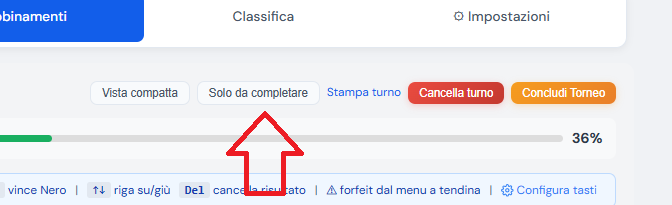
4) “Only to complete” filter in pairings


I added it both for team tournaments (Pairings tab, next to Compact view) and individual ones (top right next to “Print round”). A toggle that hides already completed matches and BYEs, leaving only those still without a result. The state is remembered per tournament (localStorage), so if you reload the page the filter stays as you left it. When you enter a match result while the filter is active, the row updates at runtime — no need to disable/enable.


If you filter everything and nothing remains, a green message appears “✓ All matches in this round are completed.” — so you can instantly see that the round is closed.


On the point “Leaderboard image only 5 teams”


I’ve parked that for the next release. The 1080×1080 share‑card was intended as a “shareable podium on social” (Instagram/Telegram/WhatsApp), so it’s limited to the top 5. I can’t do otherwise.


As always thanks for the millimetre‑precise tests — this round came out very clean precisely because you stressed the entire end‑to‑end flow.


Thanks to you, great changes!

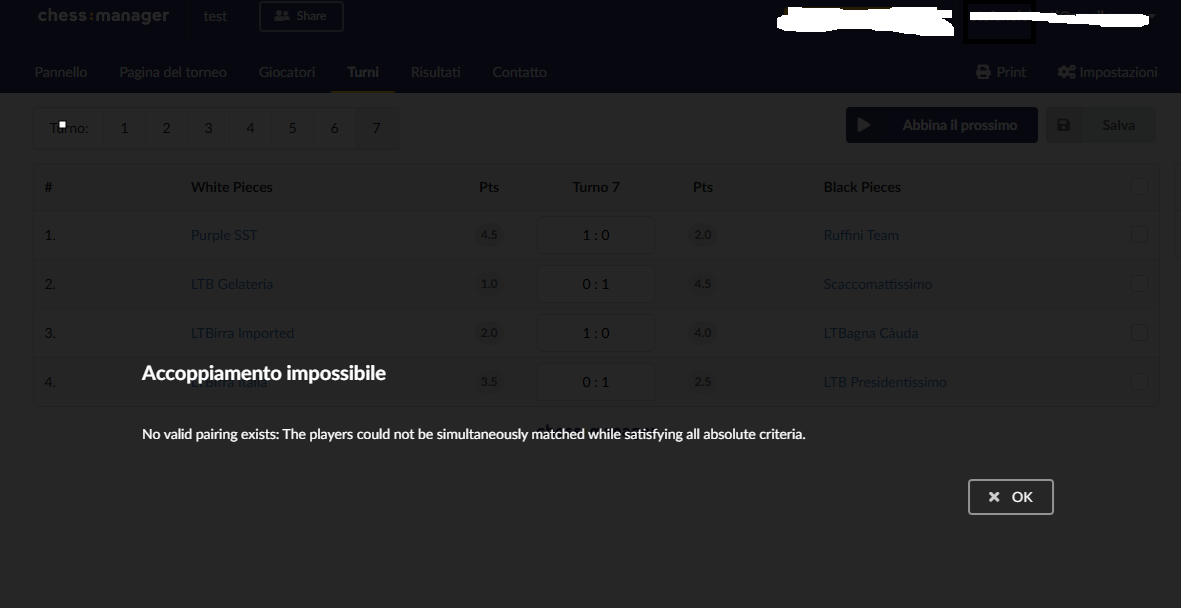
But I tried the round of a tournament again, and I ran into the problem that it cannot generate round 6 with 8 teams; it stops at round 5 with the message "The pairing engine failed to generate the round (Error while pairing /tmp/tmpbgup_izw/tournament.trf: No valid pairing exists: The players could not be simultaneously matched while satisfying all absolute criteria.

). Possible causes: too many rounds for active teams, unsolvable color constraints. You can use "Manual pairing" or reduce num_rounds and conclude.". If you want to investigate I'm here: https://my.chesspairings.org/torneo_squadre.php?id=240&tab=abbinamenti. We had pointed this out, why is it highlighted outside? A stress test is absolutely needed for every version...

hello @LTB

Investigated thoroughly. It is not a regression, it is a real mathematical impossibility caused by the setup. Here’s the analysis:

Tournament 240 Analysis

8 teams, num_turns=9, theoretical_max=7 (N-1 for even N). At round 6, reconstructing who‑has‑met‑who from rounds 1‑5:


┌─────────────────────┬──────────────────────────┬────────────┐

│ Team │ Already met │ Remaining │

├─────────────────────┼──────────────────────────┼────────────┤

│ 1899 LTBirra Italia │ 1902,1905,1903,1901,1904 │ 1900, 1906 │

├─────────────────────┼──────────────────────────┼────────────┤

│ 1900 Ruffini Team │ 1905,1902,1904,1903,1901 │ 1899, 1906 │

├─────────────────────┼──────────────────────────┼────────────┤

│ 1906 Purple SST │ 1901,1904,1902,1905,1903 │ 1899, 1900 │

└─────────────────────┴──────────────────────────┴────────────┘


The teams {1899, 1900, 1906} form an impossible triangle: each has only the other two of the trio as available opponents. In a single round you can form only ONE pairing, leaving the third team without anyone to play (all others have already met them). bbp6 correctly rejects it — there is no valid pairing without a rematch or bye in a tournament with an even number of teams.

Even the other 5 teams have very tight clusters (e.g. {1901,1902,1904,1905} with few alternatives). An exhaustive search confirms that after these 5 rounds there is no sixth valid matching.

The setup

8 teams, Swiss system. You set up 9 rounds. Important: in a Swiss tournament with even N, each team can meet at most N-1 distinct opponents (8 teams → each can play at most 7 different matches, because the 8th would be themselves).

After 7 rounds you have exhausted all possible opponents — if you need more you must resort to rematches or byes. So from the start 9 rounds with 8 teams is “over budget” by 2 rounds.

The first 5 rounds

The bbp6 engine generated 5 regular rounds. Result: each team met 5 opponents out of 7 possible, leaving 2 still “free”.

Reconstructing from the DB who‑has‑met‑who:


LTBirra Italia (1899) → still free: Ruffini (1900), Purple SST (1906)

Ruffini Team (1900) → still free: LTBirra (1899), Purple SST (1906)

Purple SST (1906) → still free: LTBirra (1899), Ruffini (1900)


LTBagna Càuda (1901) → still free: Imported (1902), Gelateria (1904)

Imported (1902) → still free: Bagna (1901), Scaccomatt. (1903)

Scaccomatt. (1903) → still free: Imported (1902), Presidentiss. (1905)

Gelateria (1904) → still free: Bagna (1901), Presidentiss. (1905)

Presidentiss. (1905) → still free: Scaccomatt.(1903), Gelateria (1904)


The problem at round 6


Just look at the first 3 lines. LTBirra, Ruffini and Purple SST have a special property: each has ONLY the other two as available opponents. All the other 5 teams in the tournament have already met them.

Draw a triangle:


LTBirra

/ \

/ \

Ruffini—Purple SST


In a single round you can form only one pairing within this triangle (e.g. LTBirra vs Ruffini). But the third team (Purple SST) remains without an opponent: it cannot play LTBirra or Ruffini (they’re occupied), and all other 5 have already met it.


So round 6 is simply impossible without:

- (a) a rematch (someone plays the same team twice), or

- (b) a bye (an 8‑team tournament forces everyone to pair up: zero byes allowed by FIDE)

bbp6 does its job and says “no”: it’s the mathematically correct answer. FIDE Swiss rules forbid both automatic rematches and skipped pairings if there is no scheduled bye.

Bbp6 tries to avoid exactly these situations with a lookahead mechanism (it looks 1‑2 rounds ahead and tries not to close off paths). But the lookahead isn’t infinite: at 5‑round depth with the results distributed in a certain way, the engine may fail to see the triangle coming.

Moreover, in tournament 240 teams have highly variable scores (from 10 to 2 points per game), and when the engine must balance “same score” + “alternating colour” + “no rematch” + “n‑1 tiebreak levels”, combinations clash. Often a choice made at round 3 was the only possible one then but closed off a path by round 6.

What could have avoided the situation

- Never start the tournament with num_turns > N-1: try 7, the system would finish without problems (theoretical max = 7 = num_turns, the engine has enough lookahead to plan).

With 5 rounds under‑budget there’s zero risk.

- A setup of 9 rounds: we’re already pushing above the theoretical maximum by 2 units. Even if the engine were perfect up to 7, from round 8 onwards manual pairing would still be needed.

The last 3‑4 rounds will involve manual pairing, allowing rematches.

The “bug” doesn’t exist. The “fix” we made is working. What’s missing is a stronger warning at the start that would have said “watch out, you have 9 rounds with 8 teams, the system guarantees at most 7 automatically” — and that’s what I’ll add.

I can confirm that even trying it with chessmanager.com, it is not possible to complete the tournament:

Great analysis, thank you! Sorry for all the stress, but we absolutely need to create a foolproof system, and that’s why I’m testing the toughest scenarios and most unlikely situations! I can confirm that starting the tournament with the correct number of rounds works fine. I’ll keep stressing you out until I can’t find any more problems! From now on I won’t touch anything else or propose changes; let’s run the tournament tonight and cross our fingers!


Thanks again,

Claudio.

Hi @LTB, no problem at all—my hope is that the software becomes widely adopted and can spread as an alternative to paid options, helping circles and clubs.


Today we’re pairing about 1,000 individual games per day. The odd one out is team tournaments, but I believe with your help we’ll be able to exit beta quickly.

Hello @LTB


Could you send me the link to the team tournament? If it doesn't crash tonight, I'll try following it.

Hello Stefano,

Thank you for your concern, and sorry I didn’t paste the tournament for you; we were all busy, I was also playing and didn’t really check the Forum. But the tournament (https://my.chesspairings.org/pubblico/torneo_squadre.php?id=208&token=5f5b5aa47b850102f0424a8bad91d113bad9d40eff9fc4c3fb31bd8177241113) went very well, everything ran smoothly! In the end we had 11 teams of 3, with 9 rounds, and everything worked as it should. At this point I will open a new thread for any further comments, since this is getting too long.


Thanks again and goodbye!

Claudio.

hi @LTB great news! Let me know what else I can do because I want to release the teams portion from beta

Great. For me, to exit the beta, it’s enough that everything works, and at the moment I have no reports to make in this regard. The others I’ll do are “nice‑to‑have” features to make the process simpler and help the arbiter’s work. The biggest problem I see is the introduction of bugs due to new functions (but here I don’t need to explain that to you). Now, under the verified conditions, everything works; we just have to ensure this solid foundation isn’t undermined by future features! And I know very well how easy it is for that to happen!


For example, this may sound silly, but it would be really useful for us: a function to “update” participants’ Elo using the FIDE database (if a player was added manually, of course nothing should happen… there could be a case where a player had no Elo at registration time and then entered the lists, wanting their rating updated, or a manually added player who is already on the lists, but that’s hard to apply due to homonyms). Anyway, here’s a practical scenario: our first tournament was a 3+2, so we used Blitz Elo to populate the registrants (an important function). Now, for the next tournament, and to avoid rewriting everything, what I do is duplicate the just‑finished tournament and change what needs changing (date and clock settings). That’s really convenient! But since our next combined tournament will be Rapid (12+3), I have to manually adjust everyone’s Elo, defeating the cloning process. If there were a function that let me use Rapid Elo instead of Blitz (or more generally update Elo from the latest FIDE snapshot, automatically adjusting it to the clock time) that would be really handy!


Hi,

Claudio.

Hello @LTB


Your idea of updating Elo from the FIDE database was one of those "small" things that change everything when you organize a combined event, and I immediately put it into production: it's already active in v5.10.7.

It works in two ways:

1. In the tournament, Participants tab — see the “Update rating from FIDE” button next to “Print participants”, visible while the tournament is in Registration state (i.e., before it starts). Clicking it opens a preview with three tabs:

  1. To update: each row shows current rating → new + Δ. Nothing is written until you click “Apply”.
  2. Unchanged: those already aligned to the current FIDE snapshot.
  3. Skipped: players added manually / from the club (which we decided not to touch), and FIDE players who don’t have a rating in the tournament’s category (e.g., they have Standard but no Blitz — I flag them, you decide whether to update them manually).

2. In tournament duplication — in the “Duplicate” modal you’ll find a new dropdown “Rating category for the new tournament” (Standard / Rapid / Blitz). If you change the category from the source tournament, the FIDE update is performed automatically after copying, so the scenario you described—duplicating Blitz 3+2 to create a Rapid 12+3 and ending up with Blitz Elo—no longer happens: open the duplicate and the ratings are already correct.

The same works for individual tournaments and team events. There the button is in the Teams tab (above the list) and, besides the individual ratings, it also recalculates each modified team's average rating.

Two important points I want to clarify:

  1. The FIDE table is NEVER written to. Those numbers remain a mirror of the last FIDE download (the cron runs every night at 04:30). The button only updates the “snapshot” values taken at the time of registration in the current tournament.
  2. Only before launch. If the tournament is already “In Progress”, the button does not appear: changing ratings mid‑tournament would mess up ordering, tiebreaks like ARO, and especially the final Elo calculation (which starts from the initial rating). If you notice a rating needs correcting after the tournament has started, the correct approach remains manual editing of the individual participant.

Regarding matching manually entered player names to the FIDE database—the thing you said was “difficult to apply due to homonyms”—I agree; I didn’t implement it. It’s too easy to assign a wrong Elo to an identical name, and then it becomes hard to notice.

Practical check: I’ve already looked at your tournament 257 of the Combined event (Rapid 12+3, duplicated from 256 Blitz 3+2). The system sees 34 ratings to update, 1 already matching, and 4 to skip (presumably manual players or without Rapid rating). Open it, click the button, verify in the preview that everything makes sense, and apply.

Let me know how it goes.


Stefano


What a blast! Forgive the technical comment, but these features are what make the difference for me! I didn't bother checking individual Elo ratings (I will, don't believe me), but the function did its dirty work!

Hello @LTB


The Elo calculation is correct (easy to do). There's a catch :)


If the player has a FIDE ID, assign the correct K (associated with the FIDE database); otherwise, for others the K is 20.


It would be really hard to change this.

«12
Log in to join the discussion
This site uses technical and analytics cookies to improve your experience.