


Hello, are you planning to implement team tournament management?
Team tournaments
Hello @Claudio
Yes. I hope I managed it by April 10th. I've been working on it for a while, but it's still not as usable as I'd like!
Have you tried the platform yet? How did it look to you? Suggestions and feedback are welcome.
S.
Edited on 01/04/2026 17:05
Yes, I tried it; I must say you did a splendid job, and if I understand correctly in very little time! And the comment "it's not usable as I like" says a lot, it sounds like it's from me! I hope to try it better and give you more meaningful feedback. I ran a test tournament, and I suffered from the lack of being able to modify the tournament once it started... I've already had situations where I needed to add a round to an ongoing tournament, and not having this and other options can be restrictive. The fact is that during a tournament so many exceptions can occur that they need to be handled on the fly (while everyone is waiting for the next round) that it's hard to anticipate them all. Thanks for the work you're doing! I hope to hear from you soon.
Claudio.
Edited on 01/04/2026 21:15
Thank you, Claudio! I’ll keep you posted on the updates.
@Claudio ho implementato la funzione per aggiungere i turni a torneo in corso:
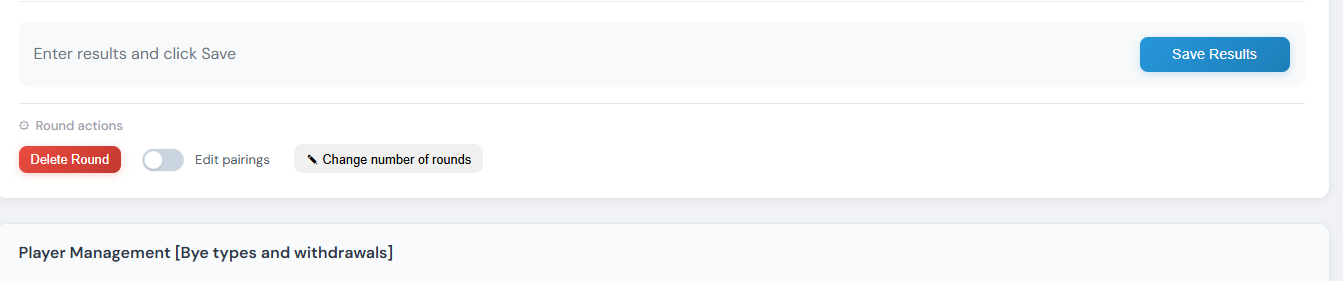
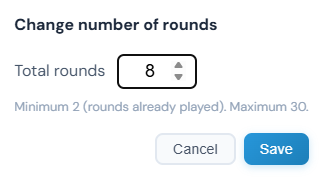
Fammi sapere se era quello che intendevi e se avessi altre richieste (il tuo feedback è stato ottimo). Ora torno sul torneo a squadre di cui ti lascio alcune anticipazioni:
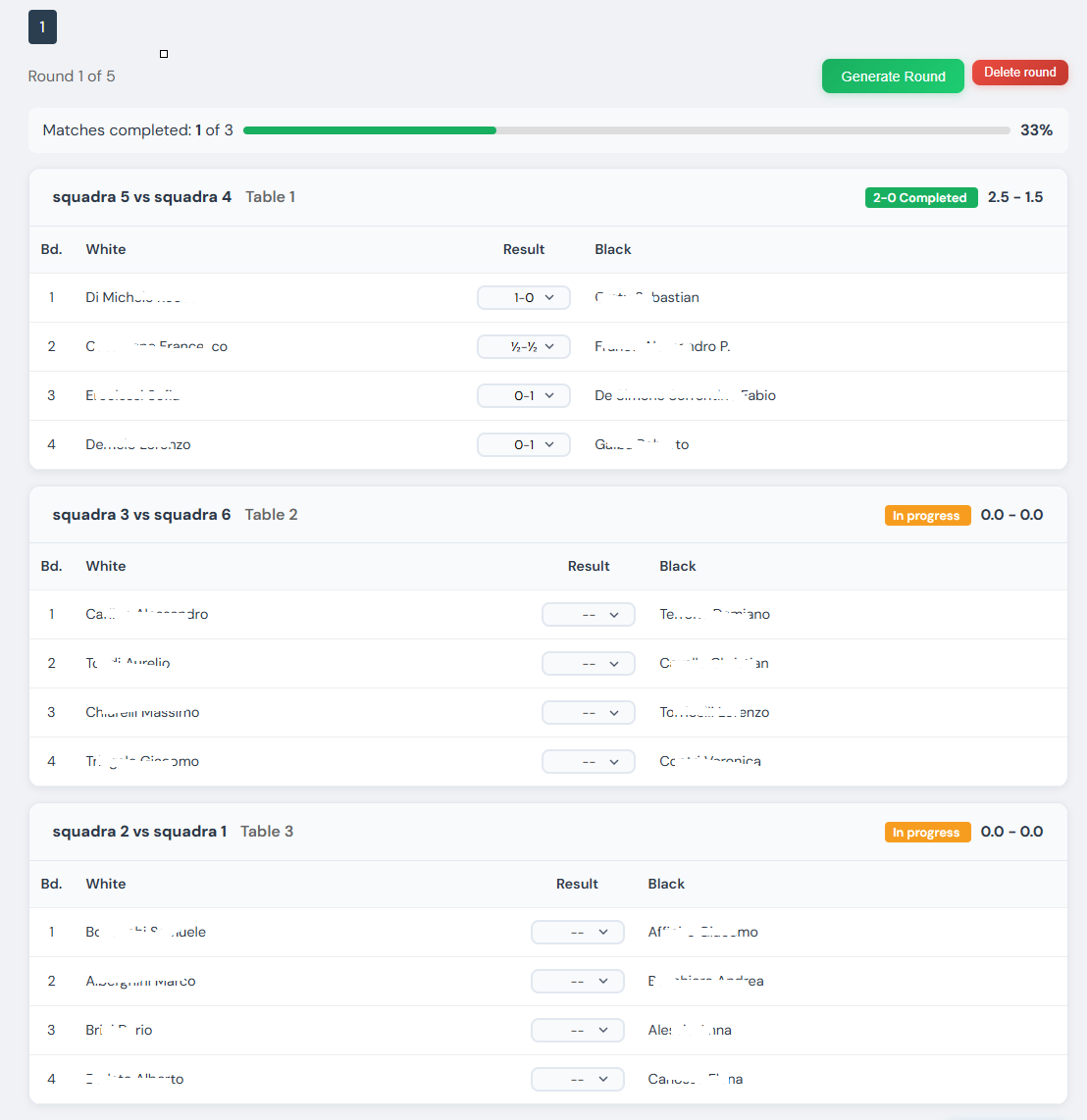
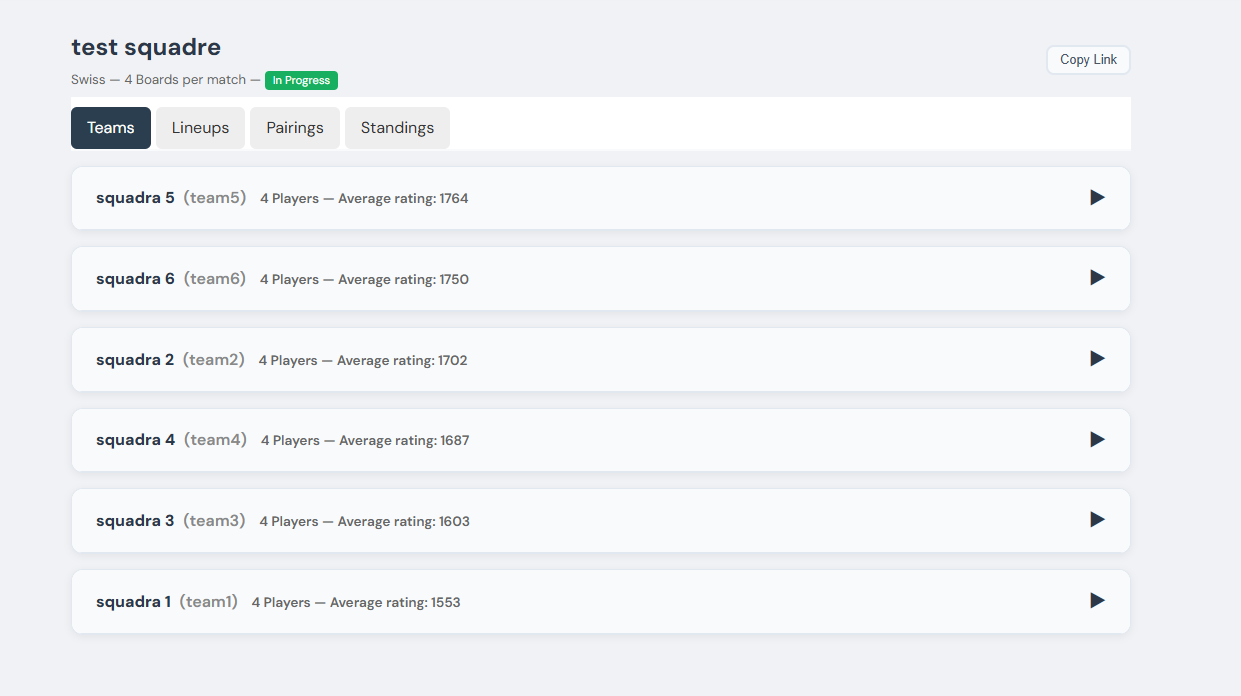
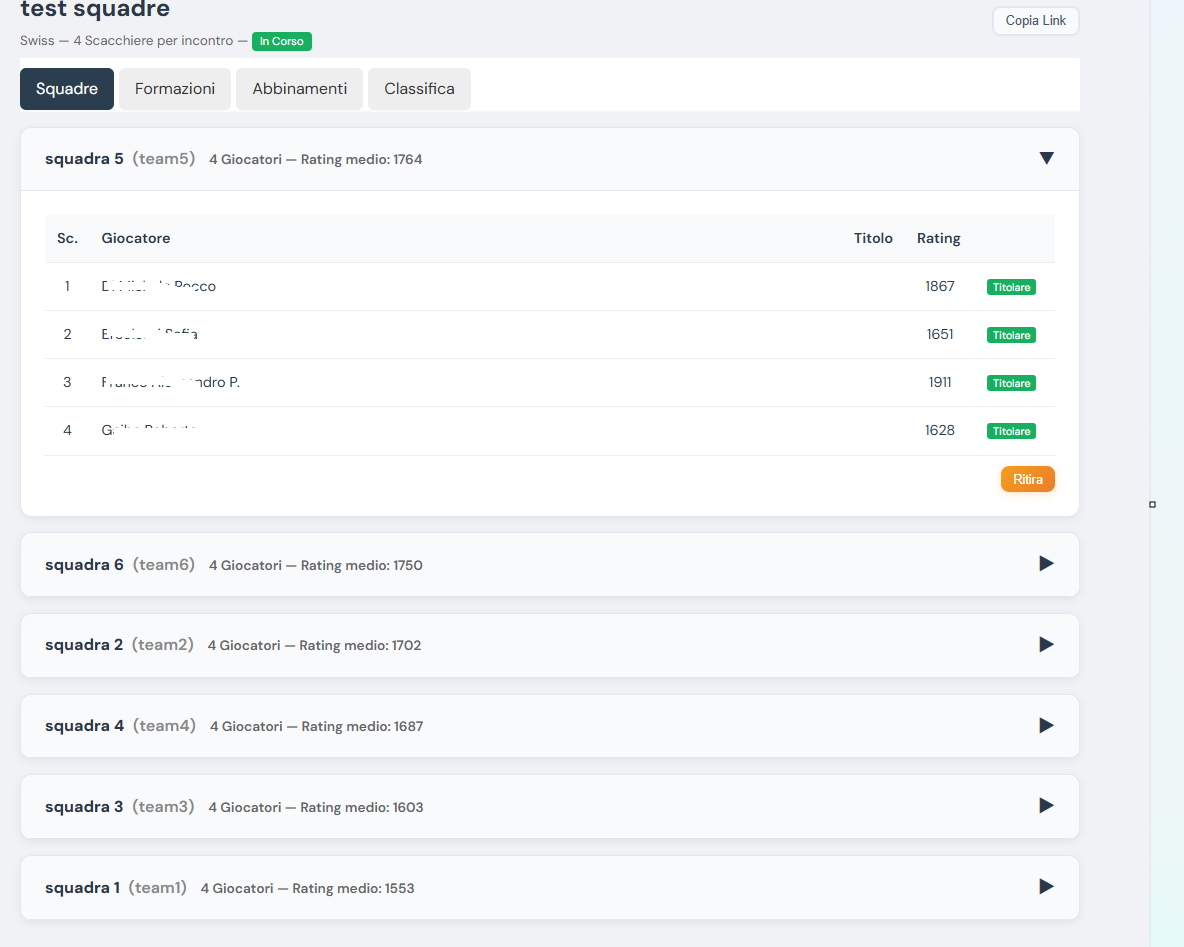
Congratulations! I will definitely try it out. And when you have implemented the team tournament “the way you like it :)” we’ll test it in the field at our club. Thanks again!
@Claudio which circle are you from?
@Claudio which circle are you from?...
We are in Turin, at the Free Tournament House of Borgo (LTB for friends)!
@Claudio We from Alessandria. We were at the CUSPO Polytechnic holding a tournament in March (organized by you)
@Claudio Happy Easter! I have launched the beta of the team tournament: https://my.chesspairings.org/torneo_squadre.php with a banner that warns users that it has only been tested with a few games:
Beta Mode — Team tournaments are still in beta with a limited number of test games. Some features may not work correctly. We invite you to create trial tournaments and report any bugs — we will address them promptly! Report a problem
@Claudio have you used the software more?
Hello Stefano, we were just about to do a field test. Don’t take it as a provocation, be patient, but for the first time we will test it alongside another scheduling program that has already been used in the past, to see the pros, cons and differences between the two. There is one point that, in practice, we have difficulty managing. For example, we organize, as far as I know, a grid tournament where the team is represented by two players. The fact is that not everyone has their team already formed. So we currently take registrations (with another registration management program, which starts with Ve and ends with sus, just to avoid naming) as if it were an individual tournament. Then, at the time of the tournament (since this registration program does not yet support pairings for team tournaments), we create the teams by manually pairing the unpaired players in the other team scheduling program, which starts with Ve and ends with ga. It would be interesting if it could be managed without this manual step, i.e., the tournament should be able to accept registrations even from those who are not captains and do not yet have a formed team. These players could go into a sort of “pool” of unpaired players that can be paired into a team by the program itself that manages the tournament (registrations and scheduling). The program could list the unpaired players, and allow at any time (before, or immediately when the tournament is about to start) to pair them into a team. Sorry for the long-windedness, and I hope I’ve explained myself in some way. What do you think of this type of management? And it would also be important (there are people who are not very young and find it difficult to explain anything) that it should be possible to register even without being registered on the site, making the registration process as easy as possible. Thank you and goodbye.
Hello Claudio
Thank you for your idea. I need to understand better how what you explained works (and see if I've understood it, because as I told you I'm not very used to the game).
Regarding the comparison, I am truly grateful; that's exactly what I'm looking for. Being able to compare with working software is the only way to understand it.
I'm sure the individual part works (bbp pairings and gacrux are used by everyone), but in team matchups I have fewer points of reference. Be strict! Thanks again @Claudio
Hello, a few additional considerations regarding team tournament registrations:
- The first page is all good, although I need to better understand the implications of the “Online Team Registrations” flag; if you don’t set it, does that mean no one (captain or not) can register online?! As I say, I’ll probably figure it out later, for now I’ll flag it.
- The second page, first “problem”. I still have no registered players; registrations must happen online. But the form requires at least two teams to be registered before proceeding. I should be able to create an empty “container” even in the absence of teams. So I created two dummy ones (“Team 1” and “Team 2”).
- The third page. Here I see the possibility to add players to previously formed teams. But as I say, at the moment I don’t have any teams yet. Anyway the form lets me continue, ok!
- Fourth page, consolation prize. Good job proposing a default. Some programs don’t provide any default consolation prize and won’t let you proceed unless you add one. But it’s fair that someone who barely knows what a consolation prize is can still create a tournament!
- The fifth page, ok! I have the tournament summary and my two dummy teams with zero players; as I said it should allow creating the tournament even with no team. In my opinion, for this reason, the “Create Tournament” button should also appear on the first page, to the left of the Next button, so that you can create an empty tournament without needing the details asked in subsequent pages. If someone wants to customize, they can go through the following pages.
Perfect, tournament created! Now, as the tournament administrator, I have the option to add teams. Appropriately I receive a message that the teams have fewer than two players; there should be an analogous message about the number of teams if it was allowed to create an empty tournament. Everything else works very well, although some steps are a bit clunky, but we’ll see that later. One “annoying” thing is that when you edit formations, every time you save something the page refreshes and scrolls back to the top. Imagine having to make several changes, and each time the page goes back up forcing you to scroll down again to continue. With many players this makes it difficult.
Let’s now address the point I tried to raise in the previous message. Unfortunately not everyone has a team already formed; many would like to register even without a partner. One solution could be to always register as captain, but that still requires creating a new team, and everything must then be manually sorted out before the tournament, which seems quite clunky: you have to (for example) use one of the two teams, add the other team’s player (manually), and then delete the second team. If there were an option to register “without a team”, these players would end up in a pool of unassigned players, and at that point the arbiter could create the team and pull from those “unassigned” players to put them in the right spot.
A very practical problem occurs when you click “Start Tournament”. The system rightly informs you that the operation is irreversible, and you can no longer modify teams. You get one or more latecomers, and even if you’d like to kick them out you would have to re-register them and redo the rounds. That doesn’t seem possible. Other programs allow you, in “delicate operations”, to reopen registrations, add players, and redo the first round. It’s not just a latecomer that creates the problem; sometimes you might realize you forgot to add a team, and so on. The system should always let you cancel the round and reopen registrations. Now for example in the test tournament I started it, but to reopen registrations I see no other way than starting from scratch and creating another one! The same issue naturally occurs with normal individual tournaments.
Another consideration regarding pairings: we normally show the round on a video when we don’t attach a large TV screen to the PC so people can come to the arbiter’s table and watch the round. And here a visual problem arises, because often a single page doesn’t allow you to see all tables, and you have to scroll to find your pairing. In team tournaments this issue is even more pronounced, because the display is even larger. In my opinion this can be solved (or at least directed) by allowing as compact a view of the round as possible. For example, there should be a button that collapses all individual boards, showing only the team pairings (with the option to expand individual teams if needed). This way many tables could fit on the same page and give an overview. I’ve seen you created a “Print Round” button that already addresses this issue well, but as I say it should also allow showing just the team names instead of the full lineup. The underlying problem is therefore to allow as many pairings as possible to be displayed on screen without scrolling. And this “problem” applies also to normal individual tournaments, where you need to save as much space as possible on the screen to show a round.
Hello,
Claudio.
Edited on 19/04/2026 14:22
Hello @Claudio
Thank you very much for the detailed feedback; it’s exactly the kind of response I need. I’ve just released v4.6.8, which addresses four of the points you raised. Here’s a summary:
1. Team tournament wizard – “empty” tournament allowed
Now at step 2 you can proceed with 0 or 1 teams. I also added a green “Create now” button in step 1, next to “Next”: this lets anyone who wants to jump straight into the core create the container with only the basic info and go directly to tournament management, where they can add teams, players, and fine‑tune things at their leisure. Curious users can still walk through the five classic steps.
2. Reopening registrations after launch
The “Delete round” button already existed, but it didn’t reset the tournament state to “registrations”—so you were stuck as you mentioned. Now, if you delete round 1, the system automatically reopens registrations: the “Teams” tab reappears, you can add a late‑comer (or a team you forgot) and click “Start tournament” again. No more starting from scratch. An explicit message confirms this after deletion.
3. Compact view of the round for projection
Centered in full: in the Pairings tab there’s a new “Compact view” button that collapses all boards, showing only team pairings (name + result). Click on a single match to expand it as needed. The preference is remembered per tournament, so if you open it on the PC connected to the TV it starts already in compact mode next time. Perfect for displaying many tables at a glance.
4. Scroll jumps back to top after each save
Resolved: after any save (formation, result, roster reordering, etc.) the page restores the scroll position where you were. No more having to scroll down every time.
The point I haven’t implemented yet – the “pool” of players without a team
On that you identified a real and interesting use case (grid, pairs, rapid tournaments) that currently forces the manual process you described. It will take more design work: public registration with a third option “I register without a partner”, an “unassigned players” view on the arbiter side, and possibly automatic pairing. I’ll put it in v4.7.0 – if you have any details about the ideal flow (for example: does the arbiter want to pair manually or by a criterion like rating? Who gets the role of captain for the formed pair?) let me know; it helps me get it right.
On the “Online team registrations” flag
Exactly: if you don’t set the flag, the public registration link isn’t generated and no one can register online—you’ll have to add teams manually. There’s a description under the checkbox but it’s evidently not clear enough—I'll work on improving it.
The update is already live. Let me know how the comparison with “the one that starts with Ve” goes 😄 – be harsh, it’s the only way to see where we can improve.
Thanks again,
Stefano
Hello Stefano,
Congratulations on implementing the suggested changes!
Regarding pairing players without a team, it could indeed be interesting to pair the unpaired automatically, even though I think in practice people always agree among themselves, so manually creating teams is what happens in the vast majority of cases. Also because it's hard to imagine a pairing method that satisfies everyone… The only idea that comes to mind would be to sort the unpaired by Elo, split them into two halves, and pair the first of the first half with the first of the second half—essentially how it works in the first round of Swiss. Clearly the first team will be the strongest and the last the weakest, but if we have to choose a method this could be a reasonable hypothesis. Within a team, by default the captain will always be the player with the highest Elo, with the obvious possibility of changing that in special cases. If Elo is tied, alphabetical order can be used.
But it is essential (or priority) to be able to list players without a team and easily allow them to be added to an existing or new team. There are many ways to do this; one could imagine dragging unpaired players into a team, thereby adding them, or into a box called “New Team,” where you would then ask for the team details (team name), perhaps with a default (I know, Team <n>, where <n> is a unique sequential number). This is always with the aim of starting the tournament as quickly as possible without having to enter all the non-essential stuff. Then, once the round has started, the arbiter still has time (during play) to input details, such as the team names. The guiding principle should be: “give me the ability to start, then refine if needed.”
One thing that seems like it could waste a lot of time is the need to confirm each team's lineup individually. Imagine having 50 tables and having to confirm the lineup for every round :) There should be an option like “Confirm all lineups,” start the round, and then have time later to tweak something if necessary.
Bye,
Claudio.
hi @Claudio this weekend we’re going to Locarno to play and I’m trying to do what you suggested. Thank you again for your suggestions
Hello @stefanoloberti, I hope the Locarno tournament went well and you had fun! Know that when you encouraged me to offer some suggestions, you gave yourself a slap on the foot—nothing bad... Here are a few more thoughts regarding team tournament registrations:
- It is not possible to change the team name during registration! I suspect this could be an issue when a player wants to register directly into an existing team they have a link for, but we need to allow renaming a team for many reasons: I wrote it wrong, at the time of registration I didn’t know what name to give it, I found a more fun name, etc.
- When adding from FIDE, it should take the Elo rating for the tournament type, e.g., if it’s a 5+3 it should use the Blitz Elo, not Standard. This is “useful” even in regular tournaments, and other programs have a similar “bug.”
- During registration there is no overview; only the list of teams appears. If I want to know whether a player is registered and which team they belong to, I have to open each team one by one and search manually. It should be possible to have a view that’s as compact as possible, listing the team names, and if desired it should be possible to expand them (all) and see the members. And perhaps a filter to search for a player and determine which team they belong to.
- When opening a team for editing and registering players, next to all the names there is a zero that doesn’t seem useful. Perhaps it should show the Elo mentioned above, I think. What should this “0” represent?
Thanks as always,
Claudio.
Hi @Claudio Locarno in short :) will try to copy from the Basel one from mid‑May!
I think tomorrow I can get back to working on team tournaments and reflect on your latest suggested changes. You just send it, we never feared messing around here :) Thank you from the bottom of my heart really
hello @Claudio as promised I managed to work on team tournaments. Let me know if this could be the correct flow?
I released a new version (v4.7.0) that implements practically all your requests. I'm writing so you know where to look and what to test:
From the first request (the one from April 23, 2026=
- Confirm all lineups — When you generate a round, you now see above the match list a yellow notice with the button “Confirm all lineups”: one click and all tables start with the
- Default arrangement (starters in board order). After that you can modify individually those you need. I was thinking exactly of your case with 50 tables.
- Unpaired players panel — In the Teams tab, during registrations, there is now a box “Unpaired players” with the individuals who registered without a team. You can:
- Drag a player directly onto an existing team to assign them
- Select several with checkboxes and click “New team from selected” (modal with default “Team N”)
- Auto‑pair for Elo: sort by rating, split in half and pair first‑with‑first as you suggested — the top Elo automatically becomes captain
To activate individual registrations there is a new separate flag in tournament settings: “Online individual registrations (unpaired)”. From that moment the public link shows visitors two options:
“Register a team” or “Register me alone”.
From the second request (April 28, 2026):
- Rename team — Both the captain from the management link and you from admin can now rename a team at any time during registrations.
- Elo for cadence — In the wizard and tournament settings there is a new field “Cadence type (for FIDE rating)” with choice between Standard / Rapid / Blitz. For a 5+3 blitz tournament it now takes the Blitz rating
- Instead of Standard. You hit a serious bug: the system actually read from wrong fields and always ended up assigning 0. Fixed: the “0” you saw next to names was exactly that, now the real rating appears correctly.
- Team overview + filter — Above the team list you find a toolbar with “Expand all / Collapse all” and a search field that filters both by team name and player name (searches all rosters, even collapsed ones). Typing a surname instantly shows which team they’re registered in.
Email verification
There’s a new feature that also affects the flow you were already using: online registrations (both teams and individuals) now require email confirmation within 24 hours. The registrant fills in → receives an email “Confirm Registration” → clicks the link → only then is the registration active. Registrations never confirmed are deleted after 7 days. It’s an anti‑spam check that I think was necessary.
To test
I recommend creating a “TEST v4.7.0” tournament with a couple of boards and:
1. Enable both toggles (team + individual registrations)
2. Register yourself as an individual player with your email — verify the email flow
3. Register 4‑6 fake unpaired players (even with different emails) and try drag & drop, “New team from selected”, auto‑pair
4. Also create a normal team, add players via FIDE search and verify that the rating is correct for the chosen cadence
5. Generate a round → test “Confirm all lineups”
6. Try the player name filter with some full teams
The team form is still in beta with an alert banner, so if you find anything that doesn’t add up just let me know — even small UX things. Your reports have been invaluable, truly.
Thanks again.
Log in to join the discussion